An export choice you can see
PNG vs JPG for a transparent background
Use PNG when the area around your composition must stay transparent. A standard JPEG has no alpha channel, so transparent areas must become an opaque background. Compare the same original artwork below before choosing your export.
Try the same design on three backgrounds
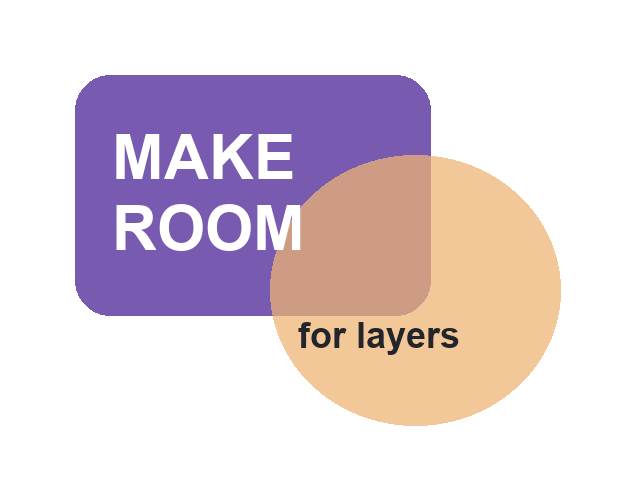
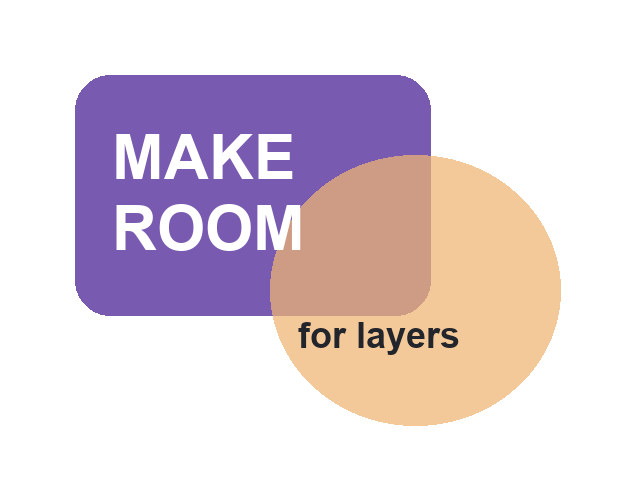
The purple card, overlapping translucent circle and text are our original 640 × 480 pixel example. Both downloads contain the same composition. The PNG keeps empty corners and partial transparency; the JPEG was flattened onto white. Changing this preview’s background leaves the files untouched.
PNG: transparent pixels retained
JPEG: flattened onto white
Checkerboard preview selected. The downloads retain their original pixels.
Keep your composition editable in Layerthimble.
Arrange photos and text in separate layers, save the local project, then export PNG or JPEG at the document dimensions. The Android app supports up to eight layers and 2,048 pixels per canvas edge. Its JPEG export uses white where the canvas is transparent.
Get it on Google PlayChoose the export around its destination
| What you need | Choose | Check before sharing |
|---|---|---|
| A cutout or layered graphic over a new background | PNG with transparency | Place the saved file over both a light and dark color. |
| A finished opaque photo or composition | JPEG can be suitable | Inspect text and edges at normal viewing size. |
| Further changes to text, positions or hidden layers | Keep the editable project too | A flattened PNG or JPEG does not preserve separate editable layers. |
Why did my transparent background turn white?
In this sample the JPEG’s white corners are intentional: they are pixels in the exported file. The PNG’s corners have zero opacity, so the preview behind them is visible. A white image viewer can make those two files look similar. A contrasting background reveals the difference immediately.
If your exported image has an unexpected rectangle, check the selected format and the canvas background. An opaque white canvas will still be white in a PNG. Choosing PNG permits transparency; it does not remove an existing background from a photograph. This resource does not remove backgrounds or convert uploaded images.
PNG and JPEG answer different questions from layers
An exported image records the visible result. In our example you can see a card, circle and text, but moving the circle afterward requires the editable composition. Saving only the PNG cannot restore the original separate objects. Keep your project before exporting a version for sharing, and use a separate filename so the share copy is easy to recognize.
In Layerthimble, hidden layers are omitted from image exports. Reopen the project to change a label or reveal a hidden item, then export again. The public app listing confirms PNG/JPEG input and output; it does not promise PSD editing, a mask suite or other editors’ project compatibility.
Check size and sharp edges separately
Both downloadable examples are 640 × 480 pixels. Changing from PNG to JPEG does not increase those dimensions or make a small image more detailed. Pick the required document dimensions before arranging the composition, then inspect the exported image’s reported width and height. For type-heavy graphics, zoom in on the text edges and compare the saved files rather than assuming the filename alone guarantees a good result.
File size depends on the picture and export settings. PNG uses lossless image compression; JPEG commonly trades some image detail for a smaller file. Neither format is always smaller. Our samples demonstrate transparency and white flattening, not a universal size benchmark.
A short export checklist
- Save the editable project while its layers are still available.
- Decide whether the destination needs transparent corners or an opaque background.
- Choose PNG for retained transparency, or JPEG for the finished white-backed version.
- Open the saved file outside the editor and inspect it over a contrasting background.
- Check pixel dimensions and readable text, then share the export.
Format references
The MDN image-format guide documents PNG transparency and the lack of a JPEG alpha channel. Adobe’s PNG/JPEG comparison explains common photo and graphic uses. Our artwork and practical workflow above are original; the downloads contain no user files or remote content.